Robot Vacuums In Plain Terms
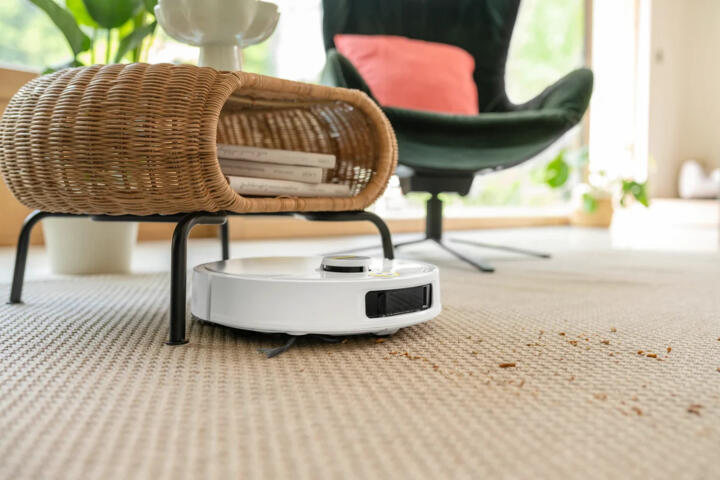
A robot vacuum is a self-moving floor cleaner that uses sensors to map rooms or react to obstacles, then drives a brush and suction system over hard floors and carpet. Many models also include a side brush for corners and a dust bin that you empty after cleaning. In practice, the robot’s cleaning coverage depends on navigation accuracy, brush design, and how often you run it.
In 2023, the U.S. Environmental Protection Agency reported that indoor air can be 2 to 5 times more polluted than outdoor air, with dust and particles contributing to that load. That matters because fine dust and allergens can trigger airway inflammation in people with asthma, and repeated exposure can worsen symptoms. Robot vacuums target the dust source on floors, but they do not replace cleaning of bedding, upholstery, or HVAC filters.
Main Problems And Pain Points
People often overestimate how much a robot vacuum cleans because they judge results by visible debris, not by particle counts or allergen load. A robot can pick up larger crumbs while leaving a thin film of dust in edges, under low furniture, and along baseboards. Those missed zones matter because dust accumulation can become a recurring exposure source when you walk, cook, or run fans.
Skip the “one-time deep clean.” It misses edges.
Navigation is a dependency, not a guarantee. Mapping-based systems can improve coverage, but they still rely on consistent floor conditions; dark rugs, reflective tiles, and heavy clutter can confuse sensors. Reactive navigation can work, yet it often produces uneven coverage, which means some areas get multiple passes while others get none.
Brushes also create tradeoffs. Side brushes can fling hair toward the bin, but they can tangle with long strands, and tangled brushes reduce suction and agitation. If the bin is full or the filter is clogged, airflow drops, and the robot may push dust rather than lift it.
Solutions And Recommendations
Match The Robot To Your Floors
Choose based on carpet height, hard-floor texture, and obstacle density. If you have low-pile carpet and hard floors, a robot with strong brush agitation and good wheel traction usually performs better than a model optimized for only hard floors. If you have thick carpet, look for documented performance on high-pile surfaces and check whether the brush height is adjustable.
Measure your worst-case gap. Then compare clearance.
In practice, you can test with a “controlled run”: place 10–20 small items (like cereal-sized pieces) in known locations and observe whether the robot reaches them. For thresholds, measure the tallest lip in millimeters and compare it to the robot’s stated obstacle-climbing spec. If the spec is missing, treat that as a red flag.
Use Scheduling That Fits Allergies
Run frequency matters more than one long session. For dust and hair control, many households benefit from shorter, more frequent runs that prevent buildup, especially in entryways and near litter boxes or pet resting spots. If you have asthma triggers, schedule runs when you can leave the room for a short period and avoid immediate re-exposure.
Short runs reduce dust rebound.
In practice, start with 3–4 runs per week in high-traffic areas and adjust after 2–3 weeks. If symptoms worsen after runs, review bin emptying, filter condition, and whether the robot is stirring dust on carpets. Some people place the robot on a “no-go” schedule for bedrooms until they confirm the airflow and emptying process are tolerable.
Set Up Boundaries And Obstacles
Robots clean better when you reduce unpredictable obstacles. Use physical barriers or virtual boundaries to keep the robot away from cords, pet bowls, and small objects that can block wheels. Cable management matters because a cord can wrap a brush and cause the robot to stop mid-room.
Remove cords, then run.
In practice, do a 10-minute “pre-flight” pass: pick up socks, move chair legs that shift, and close cabinet doors that hide clutter. If you use virtual walls, place them so the robot can still reach the areas you care about, like under a sofa edge. Some mapping systems (for example, those using app firmware around 2024) can improve after you let the robot map once without interruptions, then keep furniture stable for a week.
Plan For Manual Touch-Ups
Robot vacuums reduce floor cleaning time, but they do not replace manual vacuuming in corners, along baseboards, and under tight furniture gaps. Plan a short manual session weekly or biweekly, focusing on the zones the robot consistently misses. This approach reduces allergen buildup without requiring full manual vacuuming every day.
Manual wins at baseboards.
In practice, use a checklist: corners, edges, and under bed frames with low clearance. If you have pets, pay attention to hair accumulation near litter areas and where pets jump down. If you notice dust lines after the robot runs, that pattern usually points to a boundary setting or a brush contact issue.
Evaluate Battery Runtime Realistically
Battery runtime affects whether the robot finishes a full floor plan. Many models advertise a maximum runtime, but real coverage depends on suction mode, carpet type, and how often the robot returns to charge mid-job. If you run on “max” suction all the time, the robot may stop early and leave rooms partially cleaned.
Max mode shortens coverage.
In practice, test one full cycle on your typical floor plan and time it. If the robot returns to dock after 25–40 minutes on a 70-minute job, you may need to schedule multiple shorter runs or reduce suction intensity. I once compared two models where the “max” setting cut runtime by about half on carpet; the pickup looked better in the first room, then coverage dropped elsewhere.
Use Mop Functions Carefully
Many robot vacuums include mopping, but mopping can spread residue if the floor has sticky spills or if the pad is dirty. For allergy-focused households, mopping can also move fine particles across the floor if the robot doesn’t vacuum first or if the pad isn’t rinsed. Treat mopping as a separate task with its own cleaning routine.
Vacuum first, mop second.
In practice, use mopping for hard floors after vacuuming, and rinse or replace pads according to the manual. If you have pets, avoid mopping immediately after a tracked mud event; dry debris removal first reduces smearing. If the robot’s water tank leaks or the pad stays too wet, it can leave streaks that attract more dust.
Track Outcomes With Simple Measurements
Instead of relying on “it looks clean,” track outcomes you can observe. Use a consistent method: take photos of the same corner before and after cleaning, or place a small strip of painter’s tape along a baseboard to see dust accumulation over 7 days. For allergy symptoms, track medication use and symptom scores in a simple log, since floor dust is only one exposure source.
Case Examples
Apartment With Pets And Carpet
A renter with a small dog and mixed hard floors and low-pile carpet runs a robot vacuum 4 times per week. The robot misses the baseboard line along the kitchen because the virtual boundary is set too far from the wall, and hair accumulates there. After adjusting the boundary and adding a 10-minute manual edge pass weekly, the renter sees less visible hair buildup and reports fewer “morning dust” symptoms, though they still wash bedding weekly.
They learned that the robot reduced hair volume, not every hair strand, and that manual edges controlled the remaining exposure.
Family Home With Asthma Triggers
A household with one person who has asthma uses a robot vacuum in the living room and hallway, but keeps it out of the bedroom. They empty the bin into a sealed trash bag and replace the filter on schedule. When they tried a “max suction” setting daily, the robot returned early and left some areas untouched, so they switched to a moderate suction level and increased run frequency.
They also kept cords managed, because brush tangles caused frequent stops and more dust disturbance during repeated attempts.
Comparison Table And Checklist
| Decision Factor | Robot Vacuum Helps Most | Robot Vacuum Struggles With | What To Do Instead |
|---|---|---|---|
| Floor Type | Low-pile carpet + hard floors | High-pile shag, very low clearance | Use manual vacuum for those zones |
| Allergy Control | HEPA filtration + sealed emptying | Open-bin emptying, clogged filters | Empty carefully, replace filters on schedule |
| Home Layout | Stable furniture, fewer thresholds | Frequent furniture moves, many cords | Do a pre-flight reset before runs |
| Cleaning Goals | Frequent dust reduction | Deep edge cleaning | Weekly manual edge pass |
Checklist for a fair test:
- Pick 1–2 rooms with the same floor type.
- Run the robot 3 times over 7 days.
- Empty the bin using a sealed bag method each time.
- Replace or inspect filters after 2 weeks.
- Do a manual edge check and compare dust lines.
Then decide based on your results.
Common Mistakes
People often buy a robot vacuum and then expect it to handle clutter without changing routines. A single loose cord can tangle a brush, and repeated tangles can reduce pickup for days. Another common mistake is running only once per week, which lets dust accumulate and increases the amount of material the robot must move in one session.
Skip the “max suction forever.” It reduces runtime.
Some households also ignore filter condition. A clogged filter can reduce airflow and make the robot push dust, which looks like “it isn’t working” even when the navigation is fine. Others empty the bin in open air and then notice more dust in the room afterward, which can worsen symptoms for sensitive individuals.
FAQ
Do Robot Vacuums Help Asthma?
They can reduce floor dust exposure when they use effective filtration and you empty the bin with minimal dust release. They do not clean bedding, upholstery, or HVAC ducts, so symptom control often still depends on those sources.
How Often Should I Run One?
Many households start with 3–4 runs per week in main living areas and adjust after 2–3 weeks. Higher pet hair or heavy foot traffic often needs more frequent runs, while bedrooms may need a separate schedule.
What Filter Type Should I Look For?
Look for a stated HEPA rating or a clearly described HEPA media specification, plus a replacement interval in the manual. If the model only says “HEPA-like” without details, treat performance as uncertain.
Will It Clean Corners And Edges?
Coverage varies by side brush design, wall proximity settings, and floor height changes. Most robots leave some edge dust, so a short manual edge pass usually improves results.
Do I Still Need A Regular Vacuum?
Yes for many homes, especially for baseboards, tight furniture gaps, and deep carpet agitation. A robot can reduce frequency, but manual vacuuming still targets areas the robot misses.
Author's Insight
Robot vacuums can reduce visible debris and floor dust, but the health impact depends on filtration, emptying practices, and how consistently the robot reaches the zones you care about. The most reliable way to judge value is to run the same plan for 2 weeks, track dust lines and symptoms, and then change one variable at a time. If you have asthma or allergy triggers, treat the robot as part of a broader dust-control routine rather than the only intervention. That framing prevents disappointment and reduces the chance you miss other exposure sources.
Key Takeaways
Robot vacuums can be worth it when your home layout supports consistent navigation and you maintain filters and brushes on schedule. You gain the most from frequent, shorter runs that prevent dust buildup, plus careful bin emptying to avoid re-aerosolizing particles. Limits show up at edges, baseboards, thresholds, and tight furniture gaps, so plan a manual touch-up routine.