Smartwatch Basics And Limits
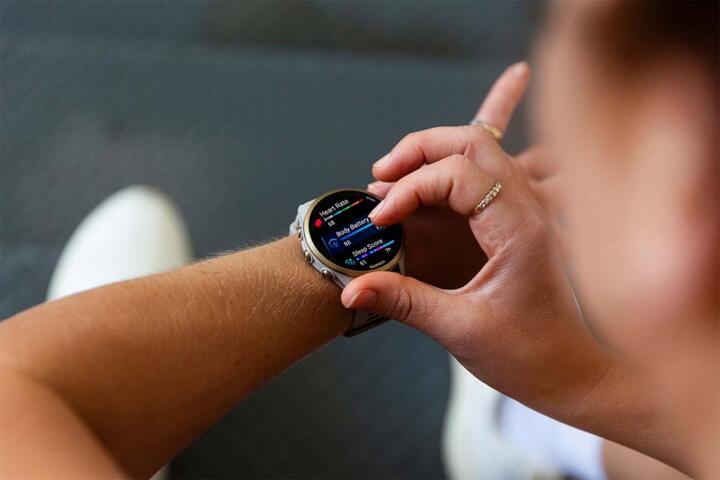
Smartwatches are wearable computers that combine sensors (like accelerometers and optical heart-rate LEDs) with apps that display trends. Many models track activity (steps, active minutes), sleep stages, and heart rate, and some add ECG or blood oxygen (SpO2). A measurable anchor helps: the U.S. FDA classifies most consumer heart-rate and activity features as general wellness products, not medical devices, unless they meet specific regulatory criteria. In practice, that means the watch may show patterns, while clinical diagnosis still requires medical evaluation.
Skip the “medical” label. They rarely diagnose.
Optical heart-rate sensors estimate pulse by measuring light absorption changes in skin. Motion and skin tone can affect signal quality, so readings often improve when the watch sits snugly and stays still during measurement. Sleep tracking usually relies on movement plus heart-rate variability proxies, which can misclassify quiet wakefulness as light sleep. Battery life varies widely; many watches advertise around 1–3 days for always-on displays, while some fitness-focused models last longer with fewer sensors active.
Main Pain Points And Misreads
People often treat a smartwatch number as a direct measurement of health status, then react to noise. Optical heart-rate can spike during arm motion, and SpO2 can drop briefly from poor sensor contact, cold skin, or tattoos. Sleep stage estimates can shift when you change bedtime routines, and they can also drift if the watch fit changes between nights. The biological mechanism matters: heart rate varies with stress, caffeine, dehydration, illness, and temperature, so a higher resting rate does not automatically mean a specific disease.
Skip the single-number panic. It rarely means disease.
Another common mistake involves dependency on notifications. If you get constant “high heart rate” or “irregular rhythm” prompts, you may spend more time checking the watch than monitoring symptoms like chest pain, shortness of breath, or fainting. That can delay care when symptoms matter. Some watches also use algorithms that flag “irregular rhythm” based on limited ECG lead data; these flags are not the same as a clinician’s diagnosis of atrial fibrillation.
Solutions And Recommendations
Start With Your Health Goal
Pick one primary reason to buy: activity tracking, sleep improvement, heart-rate awareness, or ECG-style rhythm checks. This matters because different sensors and features trade off battery life and accuracy. In practice, a person focused on steps and sleep may do fine with a model that emphasizes accelerometry and sleep duration, while someone monitoring rhythm may prioritize ECG availability and clear documentation of what the feature does. If your goal is weight loss, use the watch for activity estimates, then pair it with consistent food logging or another method; wrist steps alone rarely predict calorie balance precisely.
Choose one metric first.
Verify Sensor Claims In Specs
Check the watch’s sensor list and feature descriptions in the manufacturer documentation. Look for whether ECG and SpO2 are listed as available in your region, and whether the ECG feature is described as a medical device or a wellness function. For heart-rate, confirm whether it supports continuous monitoring and whether it offers manual readings. For sleep, check whether it reports sleep duration and stages, and whether it provides “awake” time estimates.
Read the fine print.
Use Correct Fit And Settings
Wear the watch snugly on the wrist bone, not loose on soft tissue. Optical sensors need consistent contact; if you can slide the watch around easily, readings often degrade. Turn on continuous heart-rate monitoring if you want trends, and set the sleep schedule or bedtime reminder if the app supports it. I’ve seen people get better sleep graphs after tightening the band by a few millimeters and wearing it one finger-width above the wrist crease—small changes, big differences.
Snug fit beats fancy features.
Interpret Trends With Context
Set Alerts That Match Risk
Configure alerts conservatively. If you have known heart rhythm conditions, follow your clinician’s plan for what to monitor and what to ignore. For people without a diagnosis, consider limiting alerts to events that match symptoms you already understand, like sustained very high heart rate during rest or repeated irregular rhythm notifications. If alerts trigger anxiety, reduce frequency or disable them; the goal is useful signal, not constant checking.
Fewer alerts reduce stress.
Plan For Data Sync And Storage
Confirm how the watch syncs data and where it stores history. Many ecosystems sync to a phone app via Bluetooth and then upload to cloud services; if you switch phones, you may need a transfer process. Check whether you can export data or access it without a subscription. I once saw a user lose older sleep summaries after changing phone models and skipping the transfer step—annoying, and preventable with a quick export.
Export matters for continuity.
Protect Privacy With Practical Controls
Health data can include heart-rate trends, sleep patterns, and location traces if GPS is used. Review the app’s privacy settings: disable ad personalization where possible, restrict background location, and review permissions for contacts and calendars. Use a strong phone passcode and enable two-factor authentication for the account. If you share the phone with family, consider separate accounts; otherwise, watch data can leak into shared profiles.
Privacy is a settings job.
Educational Case Examples
Case: Sleep Tracking For Shift Work
A 38-year-old with rotating shifts buys a smartwatch mainly to track sleep duration. The watch reports sleep time and “awake” periods, but stage labels fluctuate when the band fit changes between shifts. After two weeks, the person focuses on total sleep time and consistency, then adjusts light exposure and caffeine timing. The watch helps identify that sleep duration drops on late shifts, but it does not replace a clinician’s evaluation if persistent insomnia symptoms appear.
Use it for patterns.
Case: Resting Heart Rate After Illness
A 45-year-old notices their resting heart rate stays higher for 5–7 days after a mild respiratory illness. The watch shows the trend, but the person also checks symptoms like lingering shortness of breath, chest discomfort, and fatigue that interferes with daily tasks. They avoid concluding a diagnosis from the watch alone and schedule medical advice if symptoms persist or worsen. The watch becomes a monitoring tool while the clinician decides whether tests are needed.
Watch trends, seek symptoms.
Comparison Buying Checklist
| Decision Factor | If You Want This | What To Check | Reality Check |
|---|---|---|---|
| Heart Rate | Resting trends and workouts | Continuous HR, manual readings, fit guidance | Motion and contact affect accuracy |
| Sleep | Duration and consistency | Sleep duration, awake time, schedule settings | Stage labels can misclassify quiet wakefulness |
| ECG / Rhythm | Rhythm screening prompts | Availability, what the alert means, region rules | Alerts are not a clinician diagnosis |
| SpO2 | Oxygen trend awareness | Sensor type, measurement conditions | Cold skin and poor contact can skew readings |
| Battery | Daily wear without charging | Always-on display, sensor usage, charging time | Real life depends on settings |
Checklist: 7 quick steps.
- Write your top 1–2 goals on paper.
- Confirm which health features exist in your country.
- Check battery life under always-on display.
- Plan a snug fit and test it for 3 nights.
- Turn on only the alerts you can act on.
- Review privacy permissions before pairing.
- Decide how you’ll respond to concerning readings.
Common Waste Money Mistakes
Buying a smartwatch for “medical certainty” leads to frustration. Most consumer features are designed for wellness monitoring, and even when a device has ECG capability, the output still needs clinical interpretation. Another mistake involves ignoring band fit; a loose band can turn heart-rate graphs into a moving target. People also forget that wrist-based sensors measure peripheral blood flow, which changes with temperature and circulation.
Skip the loose-band experiment.
Some users chase sleep stages and ignore total sleep time. Stage labels can vary with algorithm updates, and the watch may treat brief awakenings differently across nights. Others disable continuous heart-rate to save battery, then wonder why resting trends look flat. If you disable key sensors, the app’s “insights” become less grounded.
Battery settings change the data.
FAQ
Do Smartwatches Diagnose Heart Issues?
Most smartwatch features are not diagnoses. Even when a watch offers ECG or rhythm notifications, the result still requires clinician interpretation and follow-up testing when symptoms or risk factors warrant it.
How Accurate Are Step Counts?
Step counts usually track walking reasonably well, but accuracy drops during activities with limited wrist motion, like pushing a stroller or carrying items. Use steps for trend comparisons rather than absolute totals.
Can Sleep Staging Be Trusted?
Sleep duration estimates are often more consistent than stage labels. Stage classification can misread quiet wakefulness, and it can shift when the watch fit changes or when you sleep at unusual times.
Why Does My SpO2 Reading Jump?
SpO2 readings can change due to sensor contact, cold skin, movement, and lighting conditions. If the watch reports low values repeatedly, check fit and measurement conditions, then discuss persistent concerns with a clinician.
What Privacy Risks Exist?
Risks include account exposure, cloud storage of health trends, and location data if GPS is used. Review app permissions, enable strong authentication, and limit background location access when it is not needed.
Author's Insight
Smartwatches work best as trend tools, not as standalone medical tests. Optical sensors estimate physiology through light and motion signals, so fit and context drive data quality. The most practical buying decision comes from matching your goal to the sensor set and then setting alerts you can act on. If you want clinical-grade answers, treat the watch as a prompt for questions and documentation, not as a replacement for care.
Use the watch as a log.
Key Takeaways
Smartwatches can help with activity awareness, sleep duration trends, and heart-rate pattern monitoring, but they rarely provide diagnostic certainty. Choose features that match your goal, wear the band snugly, and interpret results as trends over days rather than single readings. If you see persistent symptoms like chest pain, fainting, severe shortness of breath, or sustained abnormal readings with symptoms, seek medical advice promptly. For non-urgent concerns, start with a 2–3 week baseline, then bring the watch data to a clinician to support a more informed discussion.