Dashcams In Plain Terms
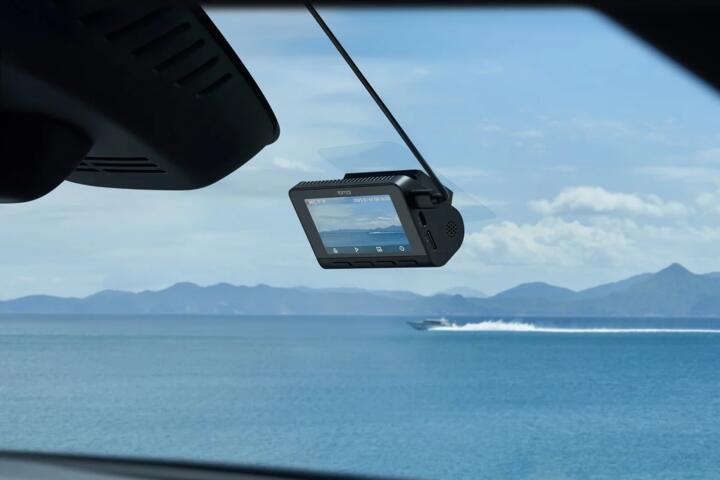
A dashcam is a small camera mounted inside a car that records video while you drive. Many models also record when parked, using a battery pack or a hardwire kit. Footage can matter when you need a timestamped view of what happened at an intersection, during a lane change, or after a hit-and-run.
Two evidence-based points help frame the decision. First, the U.S. National Highway Traffic Safety Administration (NHTSA) has long reported that police-reported crashes often involve unclear fault, and video evidence can reduce ambiguity when parties disagree. Second, dashcam video quality depends heavily on sensor resolution, lens quality, and bitrate; a higher “4K” label does not guarantee readable license plates if the camera uses low bitrate or a wide field of view that shrinks details.
Pain Points And Myths
People often assume dashcam footage automatically “proves” fault. In reality, video can show what happened, but it rarely shows every factor an investigator needs, such as speed, braking force, or whether a driver had a clear view of hazards. A short clip with a shaky angle can also miss the key moment.
Another frequent misunderstanding involves storage. Many dashcams continuously record in loops, overwriting older segments unless the event is locked. Locking can happen automatically via a G-sensor or manually with a button, but sensitivity settings vary; a camera set too sensitive may lock lots of minor bumps, while one set too low may fail to save a real incident.
Dashcams rely on supporting technologies that affect outcomes: GPS for time and location stamps, motion detection for parking mode, and the quality of the memory card. Some units use Wi‑Fi or an app for downloading clips; others require removing the card. If the app compresses video for preview, the file you download may differ from what you saw on your phone.
How To Choose A Dashcam
Pick Specs That Match Your Use
Start with coverage needs. A single front-facing camera often covers intersections and lane changes, while a dual-channel setup adds a rear view for parking impacts and tailgating. Look for a wide dynamic range (HDR) or strong low-light performance if you drive at night; glare from headlights can wash out details on cheaper sensors.
Resolution alone does not guarantee legible plates. Check reviews that show plate readability at realistic distances and lighting, not only daytime test charts. A mild aside: some “4K” dashcams record at high resolution but use a low bitrate, which can smear motion and make plates harder to read.
Lens field of view matters too. A very wide angle captures more scene but reduces detail per pixel. If you mainly want plate-level evidence, a slightly narrower view can help, even if it shows less of the surrounding road.
Plan Storage And Event Saving
Choose a memory card rated for dashcam use. Many dashcams recommend cards that support endurance and continuous recording. If you use a standard consumer microSD card, it may fail early under constant write cycles, which turns “evidence” into “nothing recorded.”
Estimate recording time based on bitrate and card size. As a rough planning approach, many dashcams record several hours to a day on 64–128 GB, depending on settings like resolution, frame rate, and whether parking mode is active. You can usually find a table in the manual; if not, test by recording a known duration and checking the file sizes.
Set event saving behavior. If your model supports G-sensor sensitivity and motion detection thresholds, tune them to your roads. On bumpy roads, lower sensitivity may prevent constant locking; on smooth highways, higher sensitivity may catch real impacts. A small frustration many drivers report: the “best” sensitivity depends on tire pressure and suspension, so one setting rarely fits every commute.
Decide On Parking Mode Carefully
Parking mode is the feature that most affects both cost and reliability. Battery-based parking mode can record for a limited time after you park, while hardwiring can support longer coverage but requires correct installation to avoid draining the car’s battery.
Hardwiring kits often include a voltage cutoff. That cutoff setting matters: too high and the camera stops early; too low and you risk battery issues. If you drive a short daily route, battery management becomes a bigger deal than the dashcam brand name.
Motion detection can miss low-speed contacts if the camera doesn’t see enough movement. Some systems use time-lapse or low-frame recording until motion triggers full recording, which can help but still depends on placement.
Educational Case Examples
Scenario 1: Rear-end dispute at a stoplight. A driver in a city records a rear-end collision. The front camera shows the lead car’s brake lights and the timing of the impact, but the dashcam does not capture the speedometer or exact distance. The insurer uses the clip to confirm that the lead car was stationary and that the following car’s front bumper contacted the rear of the lead vehicle. The claim still depends on damage photos and statements, yet the video reduces the argument about whether the lead car was moving.
Scenario 2: Parking-lot scrape with partial coverage. A driver parks near a pillar. The dashcam captures the moment a vehicle backs out, but the pillar blocks the license plate. The clip still helps identify the vehicle’s color and position, and it narrows the search for the responsible driver. The driver later learns that a slightly different camera angle could have improved plate visibility, which is a setup lesson rather than a product failure.
Decision Checklist
| What You Want | Dashcam Setup That Fits | What Can Still Go Wrong | Quick Check |
|---|---|---|---|
| Intersection evidence | Front camera with good night HDR | Wide lens may blur plates | Test a night clip for plate readability |
| Parking impacts | Dual-channel or parking mode | Motion detection may miss low-speed hits | Confirm rear coverage angle before installing |
| Long parking coverage | Hardwire kit with voltage cutoff | Wrong cutoff can affect battery health | Match cutoff setting to your car’s battery type |
| Fast clip sharing | App download or Wi‑Fi transfer | Preview compression may hide details | Download the original file and verify |
Step-by-step checklist: decide front-only vs dual-channel; choose a camera angle that covers your most likely claim scenarios; confirm the dashcam supports your preferred storage method; set event saving sensitivity; test for a week by intentionally triggering minor bumps and checking whether clips lock and save correctly. If the camera locks too often, you will eventually stop trusting it, and that defeats the point.
Common Mistakes To Avoid
Mounting too high or too low is a frequent setup error. Too high can miss the lower bumper area where contact happens; too low can capture the dashboard and reduce the view of traffic signals. A quick aside from installation practice: many people mount the camera using the included adhesive mount, then forget to re-check alignment after the first hot day, when the adhesive softens slightly.
Another mistake involves ignoring firmware updates. Some dashcams ship with early firmware that handles parking mode or Wi‑Fi transfer poorly. Check the manufacturer’s update notes and apply updates when they address recording stability, not just cosmetic changes. If you see a version number in the app like “v1.3.2” (example), confirm the release date and what it changes before updating.
Drivers also overestimate how much footage insurers can use. If the clip lacks timestamps, has corrupted files, or the event wasn’t locked, the footage may be unusable. Always verify that the camera saves the clip in a format you can open on a computer.
FAQ
Do Dashcams Work Without GPS?
Many dashcams record video without GPS, but you lose location and sometimes accurate timestamps. For claims, timestamps still matter, so check whether the camera has a reliable clock and whether GPS is required for your model’s time sync.
Will A Dashcam Drain My Car Battery?
Front-only dashcams usually draw power only while the car runs. Parking mode can drain a battery if it stays active too long or if the hardwire cutoff is set incorrectly; battery impact depends on your car’s battery health and the dashcam’s parking settings.
What Memory Card Size Should I Buy?
Choose based on your desired retention window and the dashcam’s bitrate. Many drivers start with 64–128 GB, then adjust after checking how many hours the camera records at your chosen resolution and frame rate.
Can Dashcam Footage Be Used In Insurance Claims?
Insurers often accept dashcam clips as supporting evidence, but outcomes vary by case and jurisdiction. The clip must show the relevant event clearly and include usable timestamps; corrupted or overwritten files reduce usefulness.
Are There Laws About Recording In Cars?
Rules vary by country and state, including restrictions on audio recording and where cameras may be mounted. Check local regulations and your insurer’s guidance before relying on footage for disputes.
Author's Insight
Dashcams help when they capture the right angle at the right time, and when the event gets saved before the loop overwrites it. The most reliable way to judge a dashcam is to test coverage and readability under your lighting conditions, then verify that locked clips download as original files. Storage endurance matters because constant writes can fail cheaper cards. Privacy and legal rules vary, so treat footage as evidence for specific parties rather than content for broad sharing.
Key Takeaways
Buy a dashcam if you want documented context for common disputes like rear-end impacts, intersection disagreements, and parking-lot incidents. Choose specs that match your needs: front-only for commuting coverage, dual-channel or parking mode for impacts behind you, and a memory card rated for continuous recording. Expect limits: video may not show speed or full fault, and poor mounting or low bitrate can hide license plate details.